Learn the basics: Build a diagram editor
See what you will build
Section titled “See what you will build”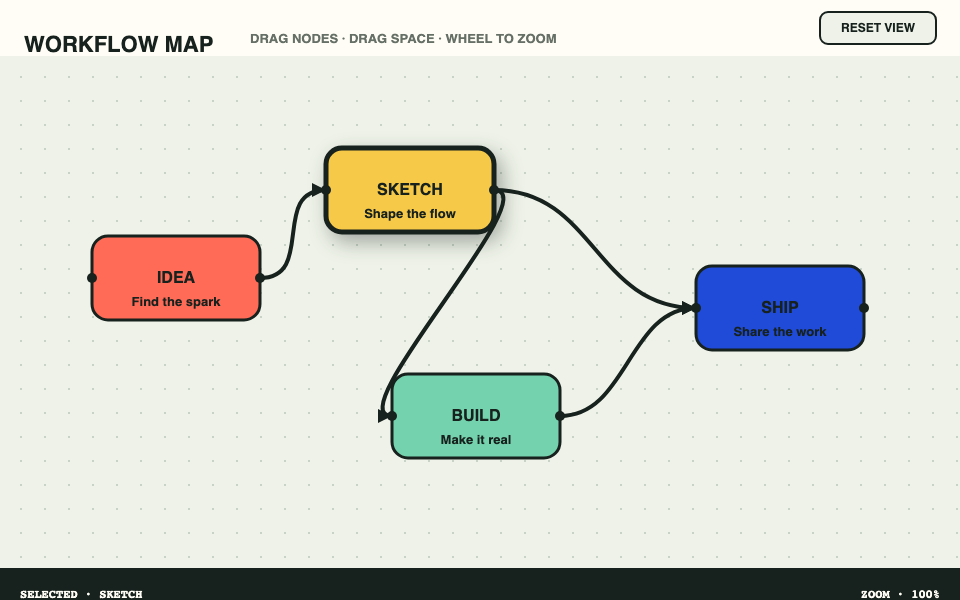
Build a small but real Canvas editor, one visible capability at a time. Every chapter is complete, editable, resettable, and independently runnable.
Start building → · Open the finished editor
Before you start
Section titled “Before you start”The default path runs in the Studio, so Chapter 1 starts with a Canvas scene rather than local setup. When you move the result into a local project, follow Configure JSX. Author without JSX is a separate supported guide; this tutorial uses the automatic Pibbl JSX runtime.
Curriculum
Section titled “Curriculum”- Create the Canvas scene — mount Pibbl, draw the workspace, and understand the controller, scheduled rendering, and disposal.
- Draw the first node — combine
RectangleandTextand introduce local style and coordinate geometry. - Connect two nodes — add a curved path, explain source paint order, and build a recognizable diagram.
- Extract a reusable node component — introduce props, children, lists, fragments, and stable keys.
- Build the editor chrome — add toolbar and status regions with Pibbl layout components and distinguish allocation from drawing geometry.
- Select nodes with state — use
useSignal, click targets, visible selection, and frame-coalesced updates. - Drag nodes safely — use pointer events, pointer capture, event coordinates, and immutable diagram state.
- Pan and zoom the workspace — apply
Grouptransforms and wheel/pointer input while keeping paint and targeting aligned. - Constrain the viewport — introduce
ClipandLayer, explain their different roles, and preserve interaction order. - Polish selection with filters — add typed shadows or glow, explain filter boundaries and nesting, and handle browser capability requirements.
- Add keyboard interaction — introduce focus management, directional navigation, activation, and Pibbl’s accessibility boundary.
- Finish and harden the editor — cover stable values, refs and reactions, cleanup ownership, component identity, failure behavior, and practical production patterns.
How the course works
Section titled “How the course works”Every chapter owns a complete snapshot: edits, reset, sharing, and recovery are scoped to that chapter and do not cross into another one. The editor teaches moving nodes, not a general diagramming product: creation, deletion, persistence, and undo are not tutorial features.
Implementation guidance for agents
Section titled “Implementation guidance for agents”Read the Authoring, signals, and lifecycle companion for ownership, adaptation, failure modes, and verification. Agent start provides the version-selection workflow.
Documentation version
Section titled “Documentation version”Documentation built with @pibbl/core 0.0.2, revision 2dccb19. ALPHA — NOT FOR PRODUCTION USE.